Multi axis chart
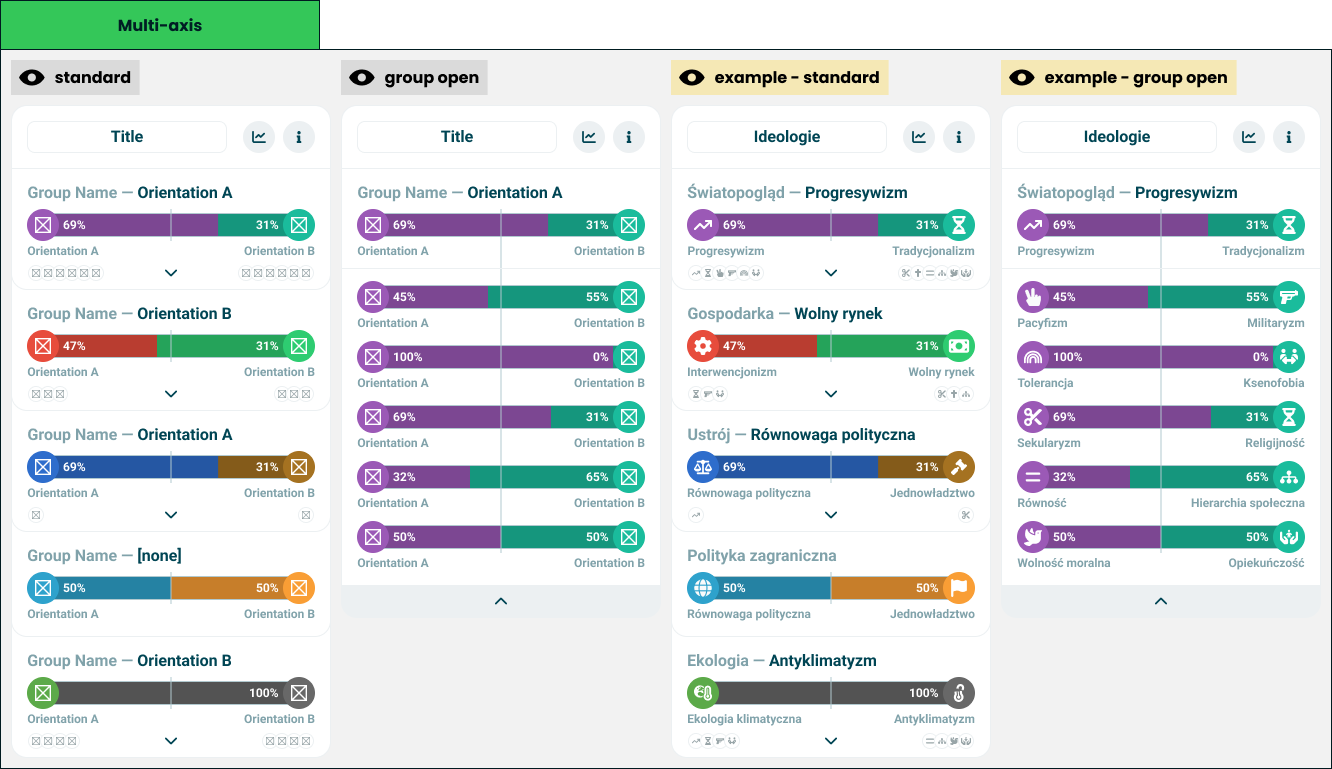
Technical specification of the module that shows groups of axes, each collapsed to the side that won it.
Docs: Multi axis chart. | Design: Figma
Kind
Front-end
Scope
One result module: a module wrapper around a list of groups. Each group is drawn as one double-sided universal axis and can be opened to show every axis it holds. The module remembers which group is open; it computes no score.
It also defines the axis row - a heading naming an axis and its lead, over a double-sided bar. The Nolan chart opens into the same rows.
Not covered here:
- How a bar draws two values, a marker or a comparison - the universal axis spec.
- Which side of a pair leads - the lead rule in the double axis chart spec.
- The card frame and its two buttons - the module wrapper spec.
- What the groups are and what belongs in each - quiz configuration. Grouping is the author's.
Data
| Input | Data | Meaning | Rules |
|---|---|---|---|
| Title | Text | The card's name | Optional, as in the wrapper |
| Groups | A list of a name and its axes | The structure the author defined | In the author's order |
| Axis | A start entry and an end entry | Two opposing orientations and their values | As in the double axis chart |
| Marker | Position 0-100, or off | The reference line, the same on every bar | Defaults to 50 |
| Comparison | The other party, and their values per axis | A friend's positions on the same bars | Optional |
| Statistics action, info action | Present or absent | The wrapper's two buttons | Optional, independent |
The first axis of a group is its headline axis: the pair that summarises the group. It is the one drawn while the group is closed, and its lead gives the group its name. In the design's example the group "worldview" is summarised by progressivism against traditionalism, and holds five narrower axes behind it.
Interface
| Direction | Name | Shape | Notes |
|---|---|---|---|
| In | Everything in Data | - | Passed in by the result screen |
| Out | Statistics requested | An event with no payload | Passed through from the wrapper |
| Out | Info requested | An event with no payload | Passed through from the wrapper |
Which group is open is the module's own state. Nothing outside is told about it.
Behaviour
Axis row
| Case | Behaviour |
|---|---|
| Heading, with a lead | The axis or group name, quiet, then the leading orientation's name, strong |
| Heading, on a tie | The name alone |
| Bar | Double-sided, with the marker, and with both poles labelled under their caps |
| Comparison values for this axis | Passed to the bar unchanged |
Closed group
| Case | Behaviour |
|---|---|
| A group | One axis row for its headline axis, headed by the group's name and the headline axis's lead |
| Group with more than one axis | Under the bar, a preview of the orientations inside - the icons of the start poles on one side, of the end poles on the other - and a control that opens the group |
| Group with one axis | No preview and no control. There is nothing to open |
| The list of groups | Every group, in the author's order, never sorted |
Open group
| Case | Behaviour |
|---|---|
| A group opened | The card shows that group alone |
| Its content | The group's heading and headline bar, then every other axis of the group as a labelled bar, in the author's order |
| The other axes | Bars with labels and no heading of their own. The labels name the poles |
| The marker | One line running through every bar of the group, since they all share its position |
| Closing | A control at the foot of the card returns to the list of groups |
One group is open at a time.
States and lifecycle
| State | Condition | What is possible in it |
|---|---|---|
| List - "standard" | No group opened | Open any group that has more than one axis |
| Group open - "group open" | One group opened | Return to the list |
The module starts as the list. The state lasts as long as the card is on screen and is not saved anywhere.
Rules and constraints
- A group's name is its headline axis's lead, and nothing else. A narrower axis with a stronger result does not rename the group.
- A tie shows no winner. The lead rule decides, on the values as displayed.
- Values are drawn as given. The module does not make a pair add up to a hundred, and a side too small to hold its number hides it, as the universal axis specifies.
- The module never hides itself. With no groups it is an empty card under its title.
Invalid and edge input
| Input | Behaviour |
|---|---|
| Group with no axes | Not drawn |
| Group without a name | The heading shows the lead alone; on a tie there is no heading |
| Axis with one value absent | Drawn by the bar with that side unfilled; the other side leads if it is above zero |
| Axis with both values absent | An empty double-sided track, and a tie |
| Orientation without an icon | Left out of the preview |
| More preview icons than fit | The row is cut at what fits. It is a preview, not a list |
| Orientation and group names longer than the room | Truncated; complete for assistive technology |
| Value outside 0-100, or not a number | Clamped, or treated as absent, as the universal axis specifies |
| Comparison values for an axis not in the module | Ignored |
Nothing here throws.
Non-functional
Rendering contexts
The result screen, comparison mode and the generated result image. In the image the caller passes no actions and the module is drawn as the list, since nothing there can be opened.
Accessibility
- The groups are a list, and each group's heading is a heading.
- Each bar announces both orientations, both values and the comparison value, as the universal axis specifies.
- The preview icons are decorative. Everything they hint at is announced once the group is open.
- The open and close controls are buttons that name the group, say whether it is open, and work from the keyboard.
- When a group opens or closes, focus moves to the control that replaces the one pressed. It is never lost.
- The lead is never carried by colour alone: the heading says it in words.
Performance
An opened group can add dozens of bars at once. The module does no measuring; opening and closing only changes which bars are drawn.
Dependencies
Build order: step 2. Needs the universal axis and the module wrapper, both built, and the double axis chart from step 1 for the lead rule.
Relies on:
- Multi axis chart doc - the idea this implements.
- Universal axis and module wrapper.
- Double axis chart - the lead rule.
Relied on by:
- Nolan chart - opens into axis rows, so this comes first.